Never follow up on
an invoice again.
Get paid automatically.
Unpaid delivers invoices, sends smart reminders, handles customer replies, verifies payments, and manages disputes — all automatically, so you never have to follow up again.
No credit card required · 14-day free trial · Cancel anytime
Works with your existing tools
Everything you need to get paid on time
Connect your accounting software, create invoices directly, or just BCC us — set your preferences, and let Unpaid handle the rest.
One-click integration
Connect Xero, QuickBooks, or Stripe in seconds — or just BCC us on your invoice emails.
AI-powered emails
Claude writes personalized, professional reminders that match your tone, brand, and customer relationship.
Smart escalation
Courtesy heads-up before the due date, then a five-stage reminder sequence from day 3 to day 30. Early reminders send automatically. Later stages need your approval before going out.
Intelligent reply handling
AI reads every customer reply — detects disputes, questions, payment promises, and requests to resend. It pauses, responds, or resends the invoice automatically so you don't have to.
Dispute & pause management
Disputes auto-pause reminders and notify you instantly. Questions pause for 3 days, "will pay" promises for 14 — then auto-resume.
Payment verification & receipts
When payment is detected, reminders stop automatically. Your customer receives a branded payment receipt, and we verify it against your accounting software on the next sync.
Create & deliver invoices
Create invoices directly in Unpaid — they sync to your accounting software and arrive with your logo, branding, and Xero/QuickBooks/Stripe payment link. Your customer sees the exact same invoice as if you'd created it there.
Weekly digest
Every Monday, get a summary of collections, reminders sent, pending actions, and email deliverability health.
Smart customer scoring
We learn who pays on time and who needs extra attention. Customer scores help you spot risks early and prioritize follow-ups on the ones that matter.
How Unpaid works
Set it up once, get paid forever
Connect
Link Xero, QuickBooks, or Stripe — or just BCC us on your invoices
Create & deliver
Create invoices in Unpaid — they sync to your software with your branding and payment link, just like you created them there
Smart Reminders
Courtesy heads-up before the due date, then smart 5-stage escalation from friendly nudge to final notice
Handle replies
AI reads customer responses — pauses for disputes, verifies payments, auto-resumes
Get paid
Payments sync automatically. You get notified. Reminders stop.
See Unpaid in action
Watch how Unpaid automates your invoice follow-ups
You stay in control when it matters
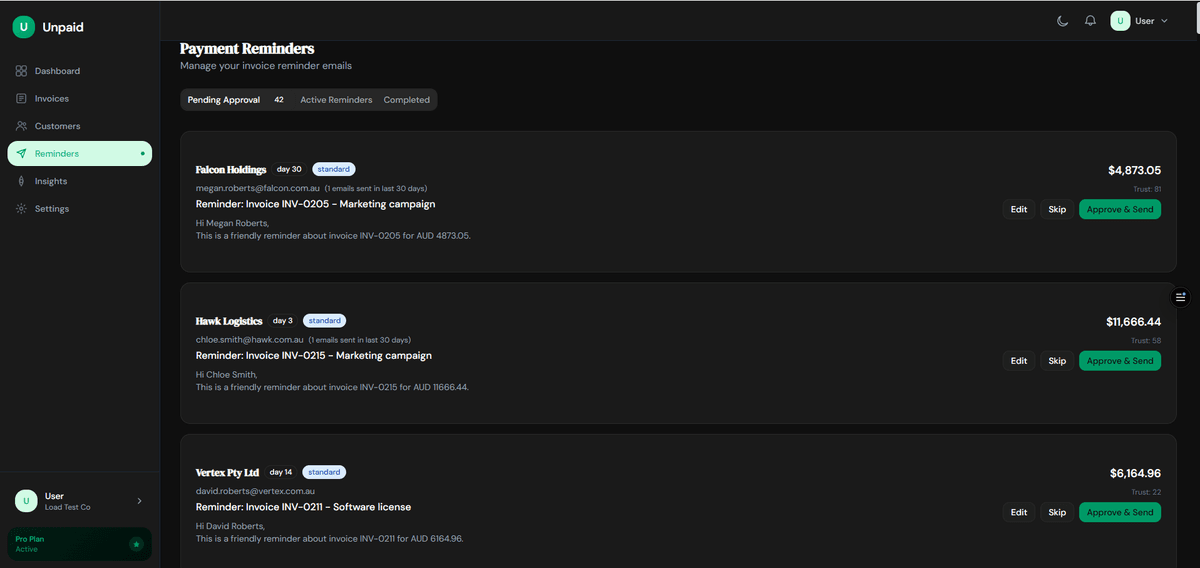
Early reminders (day 3 and 7) send automatically. But firmer messages (day 14, 21, 30) and dispute responses always come to you first. Click Approve, Skip, or Edit right from your inbox. No login needed, no surprises.
Review the emails that matter
Day 14, 21, and 30 reminders come to your inbox for approval before sending. Each shows the customer, amount, escalation stage, and full email body. Approve in one click, tweak the wording, or skip it entirely.
Hi Michael,
I hope this message finds you well. I'm writing regarding invoice #INV-2024-089 for $4,200.00, which was due on January 28th.
I understand things can get busy, but I'd appreciate it if you could arrange payment at your earliest convenience...
Relationship alert: Acme Corp is a long-term customer (12 invoices, always pays within 21 days). Consider a softer tone for this reminder.
Smart safeguards protect your relationships
Unpaid flags when a customer was recently contacted, when a trusted client might find a late-stage reminder aggressive, or when someone's getting too many emails. So you never look unprofessional.
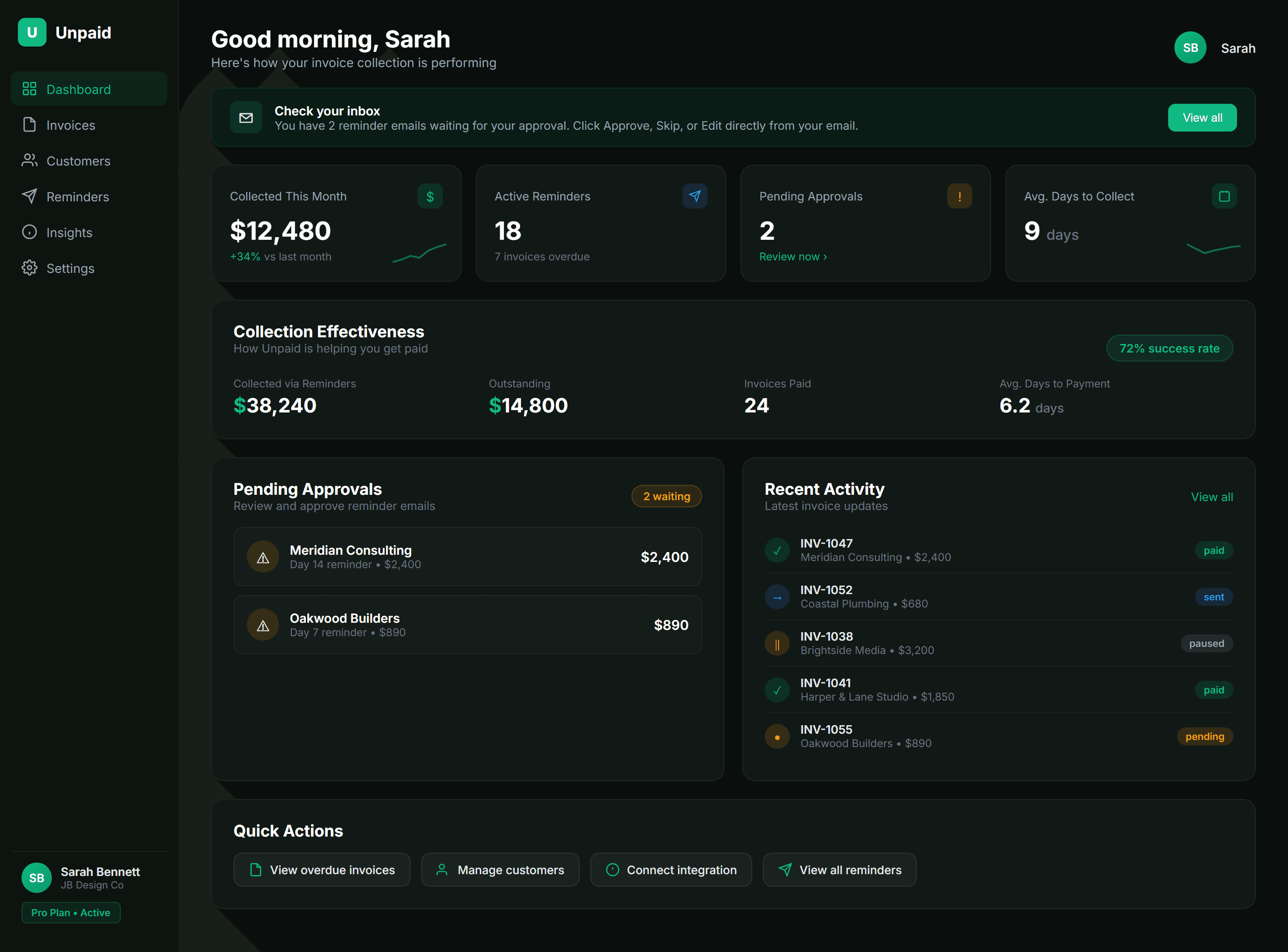
Everything at a glance
See what's been collected, what's overdue, and what needs your attention. Most users approve reminders straight from email — the dashboard is there when you want the full picture.
Your customers help themselves
Every reminder includes a link to their personal portal. Customers can see what's outstanding, pay instantly, or promise a date — without a single phone call.
Horizon Design Studio
Hi Brightside Construction, here's your account overview.
$12,450.00
4 invoices
$7,200.00
2 invoices
8
invoices
Website redesign — Phase 2
Due: 17 Feb 2026
Brand identity package
Due: 10 Feb 2026
Social media templates — Q1
Due: 5 Mar 2026
Photography retouching — Feb batch
Due: 12 Mar 2026
Questions? Contact accounts@horizondesign.co
Powered by Unpaid
One-click payments
Customers pay instantly via Stripe — no awkward phone calls or bank transfer instructions.
Promise to pay
Customers commit to a date. You get notified. If they miss it, reminders automatically resume.
Full transparency
Your customers see exactly what's owed, what's overdue, and their payment history. No surprises.
Not Templates. Genuinely Personalised.
Every reminder is written uniquely for each customer and situation
Dear Customer,
This is a reminder that invoice #12345 for $4,200.00 is now 14 days past due.
Please arrange payment at your earliest convenience.
If you have already made payment, please disregard this notice.
Regards,
Accounts Receivable
Hi Michael,
Hope the new office fitout is coming along well! I wanted to touch base about invoice #INV-2024-089 for the Wilson project consulting work ($4,200).
It was due on January 28th and I know things get hectic with the move — just wanted to make sure it hasn't slipped through the cracks.
Happy to chat if there are any questions about the scope.
Cheers,
Sarah
Emails crafted by Claude AI
Simple, transparent pricing
14-day free trial on all plans. No credit card required.
SMS Reminders Add-On
Send SMS follow-ups alongside emails for faster payment collection
starter
A$9/mo
50 SMS/month
pro
A$19/mo
150 SMS/month
unlimited
A$49/mo
500 SMS/month
Frequently asked questions
Everything you need to know about Unpaid
Connect your accounting software in about 60 seconds. You can create invoices directly in Unpaid — they sync to your accounting software and your customers receive them with your branding and payment link, just like normal. Or keep creating invoices in Xero or QuickBooks and we'll sync them. You can also just BCC us on your invoice emails — no integrations needed. Your first reminders can go out within minutes.
No problem. Just add your unique Unpaid BCC address when emailing invoices to customers. Our AI reads the email and any PDF attachments, extracts the invoice details, and starts tracking it automatically.
No. Emails are sent from your name and look like personal, hand-written messages. Our AI crafts each reminder specifically for the customer and situation.
When a customer clicks "I've Paid", Unpaid pauses reminders and verifies the claim against your Xero, QuickBooks, or Stripe data. If payment is confirmed, your customer receives a branded payment receipt and you get a "Payment Verified" notification — reminders stop automatically. If the payment can't be verified after 3 days, Unpaid sends the customer a polite follow-up asking for a payment reference or confirmation. No chasing from you either way.
Our AI detects dispute intent in customer replies and auto-pauses reminders for 7 days. You're notified immediately with the customer's message so you can resolve it directly. Reminders only resume once you're ready.
It starts before the invoice is even due — Unpaid sends a friendly courtesy reminder a couple of days before the due date so your client has time to arrange payment. If they miss it, a 5-stage overdue sequence kicks in: Day 3 (friendly nudge), Day 7 (follow-up), Day 14 (firm reminder), Day 21 (urgent), and Day 30 (final notice). Day 3 and Day 7 send automatically. Day 14, 21, and 30 always require your approval before sending — you review and approve right from your inbox.
Yes. Create invoices and new customers right inside Unpaid — they sync to your accounting software automatically. Your customer receives the exact same invoice they'd normally get, complete with your logo, branding, and their usual Xero, QuickBooks, or Stripe payment link. The only difference is you created it in Unpaid instead. Every invoice also gets an AI-crafted delivery email and immediately enters the reminder pipeline. You can keep creating invoices in your accounting software too — Unpaid works either way.
Unpaid's AI reads every customer reply. If someone asks for their invoice again, AI detects the intent and resends it automatically — with the original payment link and details. No manual work needed.
Absolutely. Choose from softer, standard, or firmer tones. You can also set regional styles and the AI will adapt its language and approach accordingly.
Yes. We use bank-level encryption for all data in transit and at rest. OAuth tokens are encrypted with separate keys, and we verify all webhook signatures. Your invoice data is synced securely and never shared.
Of course. We offer a 14-day free trial with full access to all features — no credit card required. Cancel anytime if it's not the right fit.
Stay in the loop
Get practical tips on cash flow, invoicing, and growing your business.
Get paid faster
Practical tips on cash flow, invoicing, and getting paid on time. No spam.